
Order of the Sinking Star Interface Design
What is the interface designed to do?
Expect a top-down, grid-readable puzzle view, a non-linear overworld whose routes and visible map area expand as you explore, and controls plus UI tuned for handheld play. For menu structure, input mapping, and accessibility options, open the settings menu in your platform build.
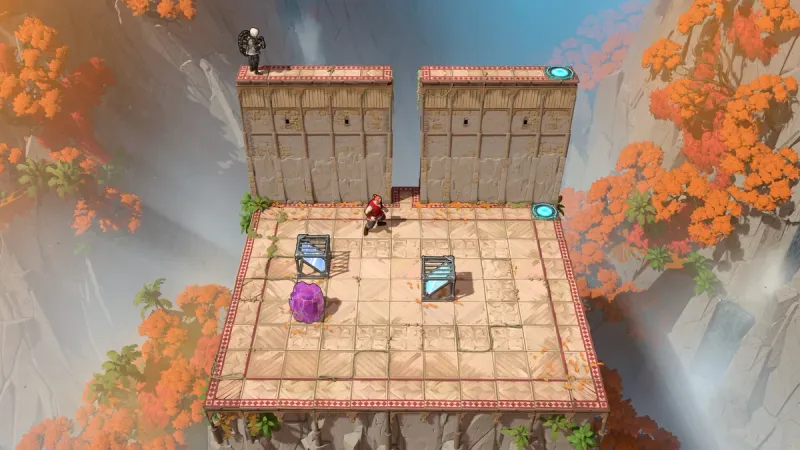
How do the room and map guide you?
Spatial layout and the overworld
Read each room as a grid of walkable space, interactable objects, and the active character. The official Explore the Realm overview describes four paths branching from the overworld, with map fog clearing as exploration expands. Check the active character, the objects you can interact with, and the route back to the overworld.
These cues help you track your position, read the current grid, and recognize routes as the world opens. Use the map page for place names; this page focuses on how the spaces are presented.
The official Making Of interview gives the clearest visual examples: the team separates the play area from walls and background with contrast, keeps play areas clean with a defined grid, and uses lighting and atmosphere to reduce visual noise. It also says level art and props are repeatedly adjusted after playtester feedback when an object is hard to notice or the layout is difficult to read.
Handheld controls and UI
The official Steam Deck announcement says controls and UI were optimized for handheld comfort and that the verified version should run without extra tweaks. This confirms the Steam Deck configuration only; check other input and accessibility options on your platform.
Readability after playtesting
Treat contrast, clean grids, and low-noise backgrounds as presentation choices, not settings you can assume are switchable. The art interview also describes level and prop revisions after playtester feedback when an object or layout was hard to read.
What you can rely on while playing
Official materials describe the top-down grid, four overworld paths, expanding map visibility, Steam Deck UI/control optimization, and playtest-driven readability edits. In your build, identify the active character, interactable objects, exit, and map position. If a cue is hard to read, check available settings rather than assuming an accessibility option exists.
Which interface details remain unconfirmed?
Quick settings check
- Open Settings on the platform you play.
- Check Controls/Input for the available mapping or remapping options.
- Check Display/Accessibility for font, color, contrast, or color-vision options.
- Record your platform and game version. If an option is absent, do not infer that another platform has the same menu.
For device-specific questions, continue with the performance and system-requirements page. For the underlying hero, mirror, beam, and light interactions, use the puzzle mechanics page.
Sources
- [1]We Are Steam Deck Verified — Order of the Sinking Star, 2026-09-15
Official announcement states that handheld UI and controls were optimized for Steam Deck.
- [2]The Making Of, Part 2: Sights & Sounds of the Realm — Order of the Sinking Star, 2026-09-09
Official art lead interview discusses visual clarity, level readability, and playtest-driven revisions.
- [3]New Trailer: Explore the Realm — Order of the Sinking Star, 2026-09-23
Official overview describes the overworld, cardinal paths, map fog, and visible puzzle interactions.
- [4]Order of the Sinking Star on Steam — Steam
Official store description confirms the four-world exploration loop and returning to challenges at the player’s pace.
Was this helpful?
Thanks for the feedback!